
Shelly Wall Display X2i
此内容尚不支持你的语言。
The Wall Display X2i, firmware codename Jenna, is a 6.9 in 1440×720 panel on a Rockchip RK3326 (four Cortex-A35), Android 11, arm64-v8a. Shelly’s specification names the RK3326-S variant; the chip itself reports only the RK3326 family, which is consistent with that. It is on the modern WallDisplayV2 OTA track alongside the X1i, XL, Maverick and Dayna, and has access to the built-in AppStore.
Panel Assistant runs on it as an ordinary Android app. The measured setup and everyday controls work without root: installing, granting its own permissions, the sensors, brightness, taking over the home screen and, in the forthcoming Panel Assistant 1.0 release, switching the screen fully off and waking it again. The 2.8.2 development checks cover only the operations listed there. Root would still buy a few privileged extras, listed under What this firmware does not have. That makes the X2i the least restrictive Shelly Wall Display documented here and the only one with a confirmed installation path.
Also sold as
Section titled “Also sold as”Shelly Wall Display X2i, firmware codename Jenna.
| SoC | RK3326-S per Shelly’s specification; the chip reports the RK3326 family, four Cortex-A35 |
| Display | 1440×720, 6.9 in, 240 dpi |
| Android | 11 (API 30), arm64-v8a, user build |
| WebView | Chromium 131.0.6778.200 as shipped, well above Panel Assistant’s minimum, so no WebView work is needed |
| Sensors | Proximity and ambient light, both ordinary Android sensors needing no permission; no temperature or humidity sensor |
| Relay | Interchangeable base: 1 output as standard, optional 2-output base. Present in software and confirmed switching, but not exposed by Panel Assistant; see Relays |
| Root | None. Developer mode unlocks adb, which is all setup needs; the privileged features below stay unavailable |
| Released | About December 2025 (est.); Shelly quietly released the X2i in Europe around 22 December 2025 (launch coverage, Notebookcheck, December 2025) |
Unlocking developer mode
Section titled “Unlocking developer mode”Shelly does not advertise it, but the X2i has the usual hidden developer-mode unlock. Open Settings → General → About Device and tap two specific labels in this order:
FW Version:, Hardware Revision:, FW Version:, FW Version:, Hardware Revision:, FW Version:, Hardware Revision:, Hardware Revision:
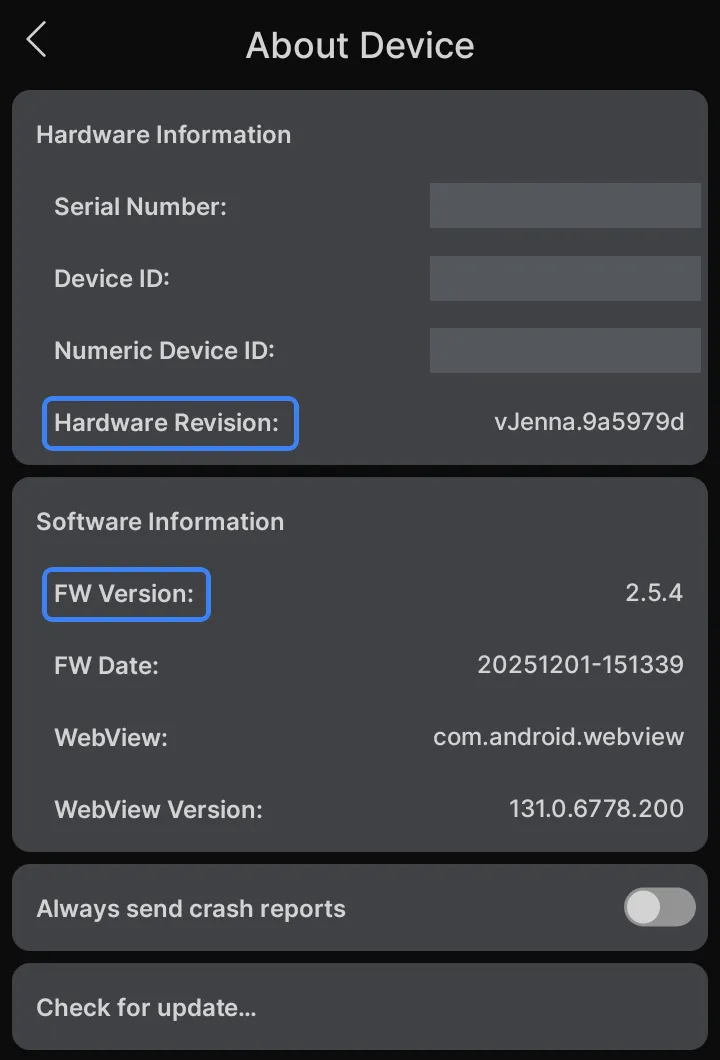
Tap the two outlined labels themselves. Not the values to their right, and not the card headings “Hardware Information” and “Software Information”, which look like the obvious targets and do nothing. That distinction is the difference between the unlock working and appearing not to exist, and it is the most likely reason the sequence is reported as unreliable elsewhere.
The screen returns to the home view after a few seconds of inactivity, so tap at a steady pace rather than pausing to check between taps.
Developer options and USB debugging then appear in Settings as on any Android device. Connect a USB-A to USB-C cable and the panel enumerates for adb. There is no authorisation prompt to accept on the screen, because this firmware does not require adb authorisation.
Installing Panel Assistant
Section titled “Installing Panel Assistant”The browser installer completed against a factory unit over USB with no root: it sideloaded the app and granted every permission it needs, including accessibility, write-settings and overlay access. From there, Panel Assistant 1.0 finishes setting the X2i up for you:
- It grants the one extra permission full screen-off needs. Shelly’s firmware keeps the screen on while the panel is powered, and the app needs permission to lift that while the screen is off and restore it afterwards. Panel Assistant grants it at setup and again after every update.
- It sets the display size and text size that suit this screen, so the dashboard and the panel’s own pages are the right scale from the first boot.
- It switches off Shelly’s corner overlay, the small Shelly control that the firmware otherwise draws over every app, so the dashboard is clean. Shelly’s own interface stays reachable: the launcher button on Panel Assistant’s navigation bar lists it with the panel’s other apps.
- It walks you through proximity setup. A few hand movements in front of the panel teach it what near and clear look like, which is what lets a wave wake the screen.
Two setup details are worth knowing before you start:
- It does not configure Wi-Fi. A boxed panel has no network, and setup continues on the panel’s own screen, which needs one. Join the panel to Wi-Fi in Settings before or after the install.
- Setup tries to make Panel Assistant the home app and checks the result. Follow any remaining chooser instruction if needed. Setting it as the home app works without root, and it holds home reliably afterwards. Shelly’s return-to-home watchdog does not take it back.
Screen off and waking
Section titled “Screen off and waking”The forthcoming Panel Assistant 1.0 release switches the X2i’s backlight fully off through Shelly’s local Stargate API without root, while Android stays awake. The first wake gesture is consumed so it does not also operate the dashboard. Earlier releases could only dim the screen.
If Shelly’s password protection is enabled, its screen API requires Digest authentication. The current implementation falls back to Android’s own screen timeout. Home Assistant can turn the screen on again through that fallback.
The wake controls are:
- Touch. A single touch wakes the panel; no double-tap is needed.
- A wave or an approach. Panel Assistant watches the proximity sensor and wakes the panel when someone comes near. This requires proximity calibration through setup.
- Home Assistant. Turn the panel’s screen on manually or from an automation.
Proximity calibration also lets the panel stay awake while someone remains nearby. These capabilities were established in the earlier measurements; the 2.8.2 development checks cover injected wake and Home Assistant recovery, with physical touch and proximity checks still outstanding. The X2i has no physical button or lock screen to get past after waking.
Sensors
Section titled “Sensors”Proximity and ambient light are both exposed through the standard Android sensor API and need no permission. Panel Assistant reported reading proximity through its raw Sensortek route rather than the Android sensor, which its own diagnostics name as driver_raw16, and reports it as a ranged signal rather than a near or far flag. Either way it reads them as an ordinary app, with no privilege involved. The proximity sensor is registered as a wake-up sensor, and it keeps reporting while the screen is fully off, which is what makes waking on a wave possible. Both parts are Sensortek STK3A5x devices on the same I²C address.
The X2i has no temperature or humidity sensor, so no room-climate readings are available from the panel itself.
Relays
Section titled “Relays”The X2i’s power base carries relays, and they are genuinely reachable from software: the panel exposes them as a world-writable sysfs class, and writing to it audibly switches the contacts with no root at all. Panel Assistant nevertheless does not offer relay controls on this panel. Its relay support activates only for a panel whose profile names a relay class, and neither Shelly profile does, so the controller stays inert and never looks. Root on its own would not change that.
Two conditions would travel with any future support, and both are easy to trip over in testing:
- Relays are inert while the panel is powered over USB. They need mains through the power base.
- The unprivileged write succeeds only because this firmware ships with SELinux in permissive mode. A future firmware that enforces policy would block it regardless of file permissions.
Until then, drive the relays through Home Assistant’s own Shelly integration.
What this firmware does not have
Section titled “What this firmware does not have”- No Recents at all. The firmware ignores the Recents key, and Android’s accessibility Recents action does nothing either, each tested with an ordinary app and with Settings in front. The reason is below both of them: the system logs that the recents task directory does not exist, so no route can produce a task switcher. Panel Assistant offers Back and Home on this panel, and no Recents control.
- No camera. The firmware declares camera features that no hardware backs, and Android enumerates no camera. Nothing declares a camera in the profile either, so Panel Assistant correctly offers none here.
- No root. There is no
suand no way to become root from the shell. Setting the panel up and using it day to day does not need it, and Panel Assistant installs and updates the app on this panel without it. A few features do stay unavailable: rebooting or switching back to the vendor launcher from the panel. Android 11 or newer can also provide screenshots and taps through the enabled Accessibility service without root; remote taps remain subject to security settings. The onboard relays are a separate matter, covered above.
Firmware, and why the shipped version matters
Section titled “Firmware, and why the shipped version matters”The unit examined here arrived factory-fresh on 2.5.4, was later updated to 2.7.4, and now runs 2.8.3. The observed 2.7.4 update changed device ownership without interrupting Panel Assistant:
- On 2.5.4 there is no device owner and no device administrator at all.
- 2.7.4 installs Shelly’s launcher as the device owner. On the unit examined here that took nothing from Panel Assistant: it stayed the home screen, kept running and stayed online in Home Assistant, and the device owner imposes no restrictions on other apps. Shelly’s launcher cannot be disabled on either firmware.
As checked on 2026-10-12, both firmware tracks offer stable 2.8.3, build 20261012-141904/2.8.3-48174502c, with no beta offered. On 2026-10-13, one X2i running 2.8.3, build 20261012-141904/2.8.3-48174502c, was checked with a signed development build for the forthcoming Panel Assistant 1.0 release. The vendor firmware update preserved the app settings, home-screen selection and Home Assistant connection. The measured operations below were also checked on 2.8.2, build 20261008-101206/2.8.2-7bb488885:
- Settings restore: 84 supported settings restored, with boot-chime suppression and network ADB explicitly unavailable and skipped. No restore failure or rollback failure was reported. An actual restore was checked on 2.8.3 after the vendor update.
- Updating through Panel Assistant, on 2.8.2 only: a normal in-place update completed through Home Assistant, with Android’s Install confirmation accepted. The app kept its settings and remained the home screen, and Home Assistant reported it healthy afterwards. No reboot, reset or uninstall was needed. This route has not been qualified on 2.8.3.
- Startup and reboot brightness: the requested brightness survived startup and reboot. After API screen-off and an injected wake, brightness held at 5 and 30 seconds; when brightness commands overlapped, the newest command won. The first injected gesture was consumed rather than opening the dashboard menu beneath it.
- Screen control: API screen-off worked with Shelly authentication disabled. With password protection enabled, Android sleep provided the fallback and Home Assistant screen-on recovered the panel after password protection was removed. An injected tap did not wake the sleeping panel in that test; physical touch wake with password protection remains unqualified.
These tests cover those operations only, and the fixes belong to the forthcoming 1.0 release. They do not establish full compatibility with either firmware or availability in the current public release. Real-finger touch and paired near/far proximity and ambient-light measurements remain to be qualified. The proximity driver was healthy, but still required calibration. Include your firmware version when reporting a problem after an update.
Since 2.8.0, modern models offer Uninstall all updates to return to their shipped vendor-app version. This unit’s shipped 2.5.4 is older than 2.6.2, so Shelly says that operation also resets factory defaults. Keep separate Panel Assistant and Shelly settings backups first; neither is a complete Android restore image. Preservation of Panel Assistant through the operation has not been verified. See the family recovery notes for the exact limits.
See the Wall Display family page for the OTA endpoints on the WallDisplayV2 track and the firmware version history.
Lower-level access
Section titled “Lower-level access”For completeness, and not because Panel Assistant needs any of it:
adb reboot loaderputs the panel into Rockchip loader mode, where the partition table reads out cleanly. Reads past the first 32 MiB silently return filler while still reporting success, so this route cannot produce trustworthy full-partition images. Check what you read rather than trusting an exit status.- Maskrom mode refuses an unsigned loader: the boot ROM enforces a signature.
- The bootloader reports itself as secure and locked, yet Android Verified Boot is not enforced, which is why the community’s root route is writing a patched boot image rather than unlocking anything. That route overwrites the running boot partition and no vendor image exists to restore it, so it is not reversible.
评论
评论保存在此页面对应的 GitHub 讨论中,因此加载评论会让你的浏览器连接到 GitHub。此浏览器会记住这一选择,并在你滚动到其他页面的评论区时加载评论。
无需 GitHub 账号即可评论