
Adaptive brightness
Adaptive brightness is an optional controller on the panel that learns the normal ambient-light pattern around it and adjusts the screen without a Home Assistant automation. It is off by default, and ordinary manual or Home Assistant brightness control is available whether it is on or off.
Choose the light source
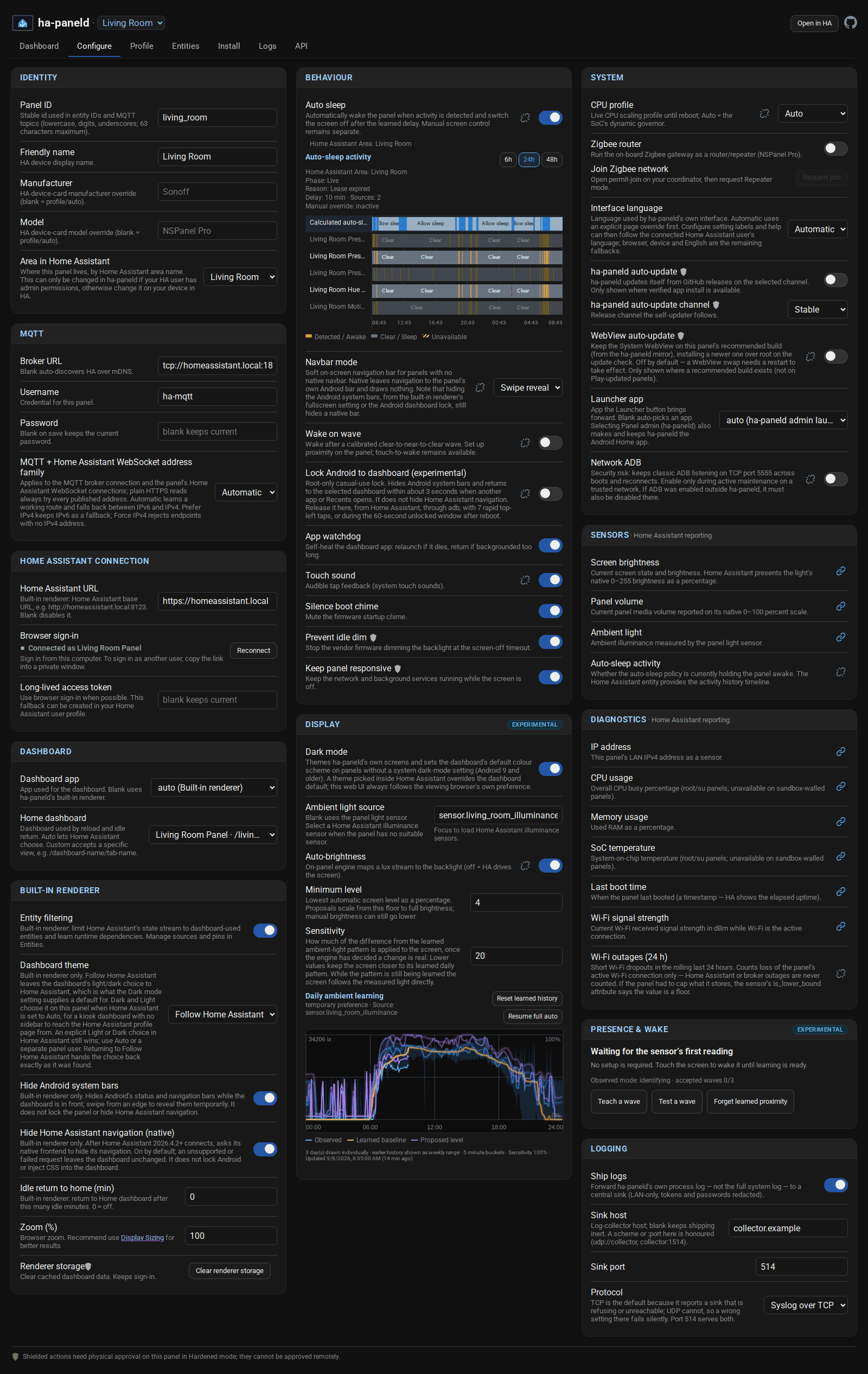
Section titled “Choose the light source”Open Configure, then Display, and choose Ambient light source:
- Leave it blank to use the panel’s own light sensor, when the active hardware profile and the panel’s live capability check both expose one.
- Select one Home Assistant illuminance entity when the panel has no suitable sensor of its own, or when a sensor elsewhere in the room better represents the light people actually see.
A Home Assistant source is read through a single subscription to that one entity rather than the full state stream. If neither source is available, the panel app leaves adaptive control unavailable rather than guessing from the time of day.
When a Home Assistant illuminance entity is the source, the panel can seed its learned pattern with up to seven days of that entity’s existing history. This gives automatic brightness a useful starting point instead of waiting for fresh readings to build up. It needs the entity to be recorded and the Home Assistant history service to be available; if no usable history comes back, learning simply starts from new readings.
Turn it on and tune it
Section titled “Turn it on and tune it”Turn on Auto-brightness in the same Display card. The controller keeps up to seven days of ambient history on the panel and learns the normal pattern for each time of day. A short rise above that pattern, such as a room light being switched on, can raise the proposed level above the baseline.
Minimum level sets the lowest level automatic control will propose, and rescales the learned range from that floor up to full brightness. It ranges from 4% to 99%. The 4% floor is where the backlight’s own minimum sits (it never blanks), so anything lower would move the control without changing the screen. It does not limit manual brightness, which can still be set lower.
Sensitivity is how much of a difference from the learned pattern is applied to the screen, once the controller has decided the difference is real. At 0% it ignores the difference and uses the learned pattern alone. Lower values give a steadier response, and the default of 50% leaves equal room to tune either way. It is not a raw follow-the-light control: a brief brightening is acted on only once it has lasted, or risen sharply enough to count, and while the daily pattern is still being learned the screen follows the measured light whatever this is set to.
The seven-day chart previews the observed range, the learned baseline and the proposed level, before or while the controller is active. Unsaved changes to Minimum level and Sensitivity show in the preview without rewriting the stored history.
The history belongs to the selected source and to a coarse room and time context taken from the Home Assistant location and time zone. A material change of location, time zone or source starts a separate history, rather than quietly applying what was learned in another context.
Manual changes and recovery
Section titled “Manual changes and recovery”A manual brightness change records a temporary preference for four hours, so the controller does not immediately fight the person who changed it. Automatic changes start with 20% influence and regain full control over a smooth four-hour fade. Select Resume full auto to end the preference straight away instead of waiting for the fade.
Select Reset learned history after moving the panel, changing its light source, or when the last week no longer represents the room. After confirmation it deletes the seven days of ambient history for the current source and context and starts learning again. It does not change the selected source or the Auto-brightness setting.
Adaptive brightness uses Android’s normal screen-brightness setting and does not need root. Reading a particular panel’s light sensor can still depend on how that sensor is reached on that hardware; the active profile and the live capability check decide.
Home Assistant control
Section titled “Home Assistant control”Where the panel exposes it, switch.<panel>_auto_brightness turns the same controller on and off. Screen brightness stays on light.<panel>_screen, so a brightness change from Home Assistant creates the same temporary preference as a change at the panel. Use Resume full auto on the Configure page to go straight back to the learned level.
Comments
Comments are kept in this page's discussion on GitHub, so loading them connects your browser to GitHub. This browser remembers the choice and loads comments on other pages when you scroll down to them.
Comment without a GitHub account