
The drag race
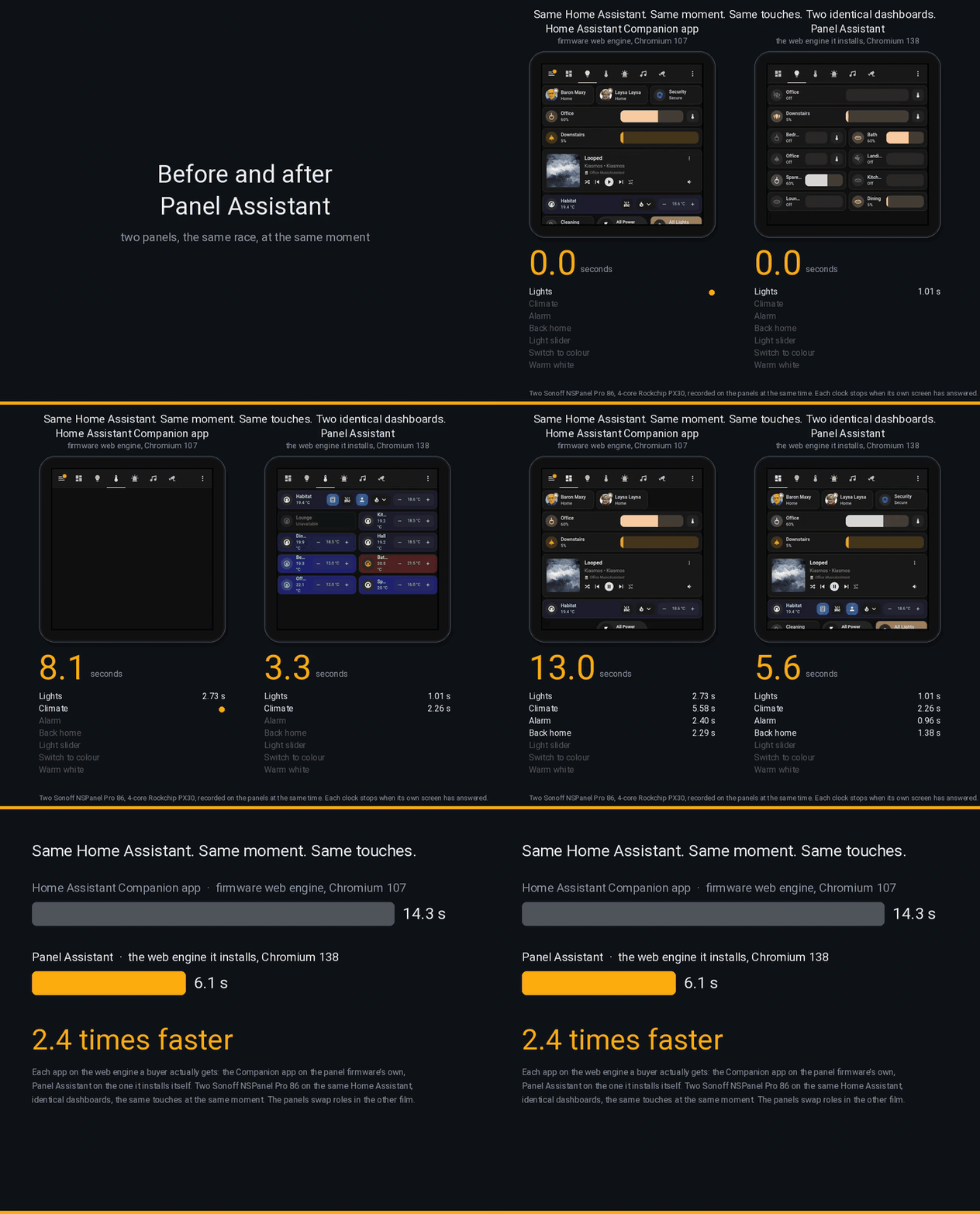
Two Sonoff NSPanel Pro 86 panels, side by side on the same Home Assistant, each showing an identical copy of the same dashboard. A script taps both screens at the same moment, page after page, and a clock under each panel stops when that screen has answered. The left panel runs the Home Assistant Companion app on the web engine the panel’s firmware ships with. The right panel runs Panel Assistant on the web engine it installs for itself. Then the panels swap roles and the race runs again, so that neither panel’s own speed can tilt the result.
Rendering: about twice as fast
Section titled “Rendering: about twice as fast”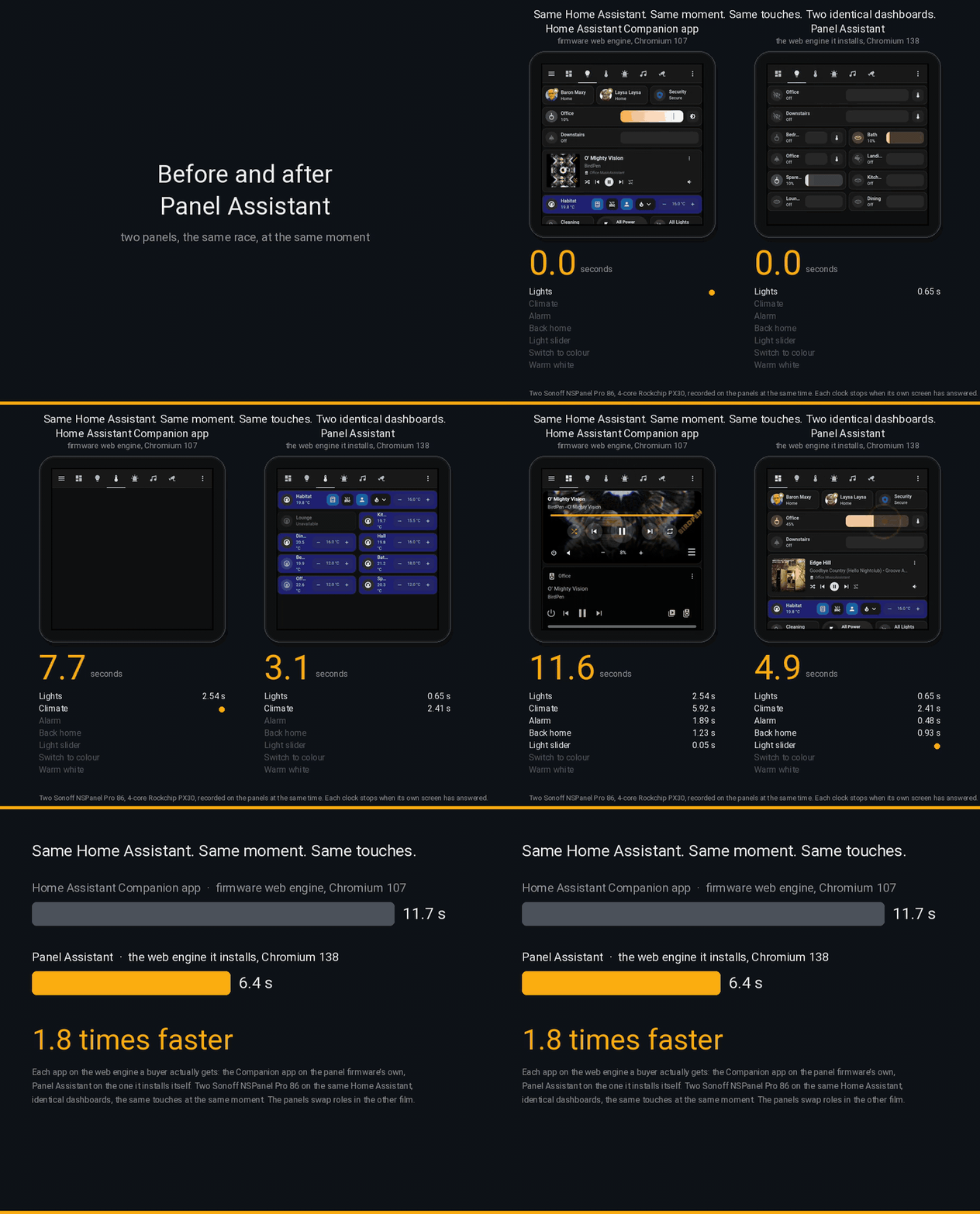
Seven touches: three page changes, a return home, and three taps on a light card. Three runs each way; the films show the median run, and the panels swap roles between the two films.
| Companion app, firmware web engine | Panel Assistant, its own web engine | |
|---|---|---|
| First orientation, median of three runs | 11.7 s | 6.4 s |
| Second orientation, panels swapped | 14.3 s | 6.1 s |
| Processor used by the drawing processes | 1.3 to 1.5 cores | 0.4 to 0.6 cores |
| Idle frame rate of the dashboard page | 5 frames a second | 59 frames a second |
| Entities the page is tracking | 4,118 | 54 |
The dashboard page under Panel Assistant is tracking only the entities it shows. Under the Companion app it receives every state change in the home, thousands of entities, and spends most of its time processing them. That is why the same page draws at five frames a second on one panel and sixty on the other, and why the drawing processes burn two and a half times the processor.
Latency: the real killer
Section titled “Latency: the real killer”Twice as fast on a stopwatch is a modest improvement. It is not what you notice on the wall. What you notice is the moment you press a button and nothing happens.
You press. You expect something to change. After more than half a second with no reaction you decide you missed, and you press again. Now both presses land: the light comes on and goes straight off again, or the page you asked for arrives and is replaced by the one your second press requested. You did everything right and got the opposite of what you wanted. A panel like that is not slow; it is unusable, and after a week nobody in the house trusts it.
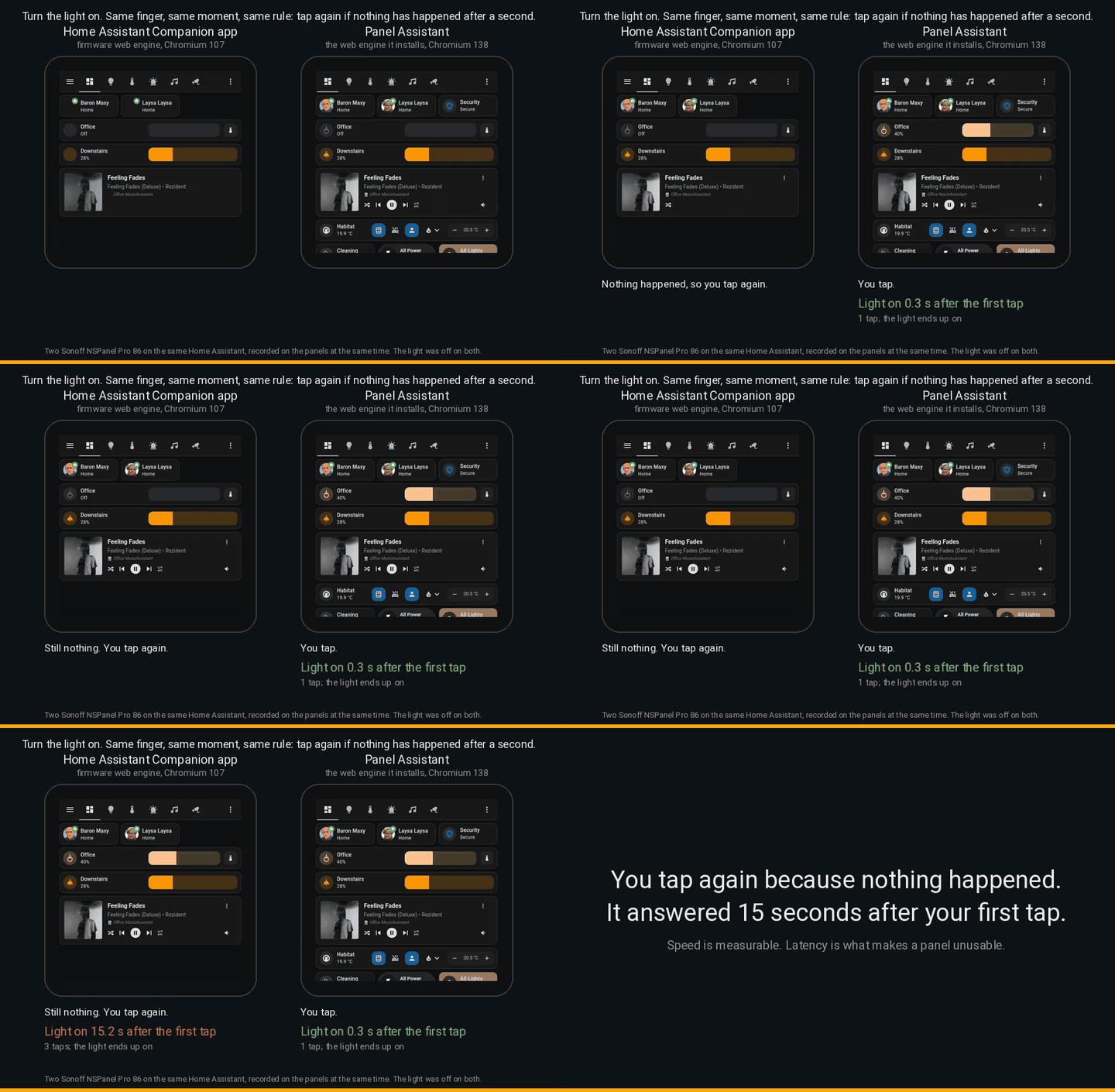
The same two panels, the same light card, the light off on both. A finger taps the light, and follows the rule anyone follows: if nothing has changed after a second, tap again, up to three times.
| Companion app, firmware web engine | Panel Assistant, its own web engine | |
|---|---|---|
| Light visibly on after the first tap | 15.2 s, after three taps | 0.3 s, after one tap |
| The other two takes | 7 s after one tap; still loading its page, three taps, nothing | 0.3 s after one tap, every time |
Fifteen seconds is not a slow panel. It is a panel you have given up on and walked away from, and the light comes on behind you. The page under the Companion app was not broken: it was busy digesting the whole home’s state stream on a four-core panel, and the touch waited its turn behind that work. Panel Assistant’s page had only its own entities to look after, so the touch was handled at once.
How it was measured
Section titled “How it was measured”- Two Sonoff NSPanel Pro 86 panels (four-core Rockchip PX30, 480 by 480 screens) on one production Home Assistant with about 4,100 entities and some 20 state changes a second.
- Two copies of one dashboard, identical apart from the light behind one card, so that the two panels never fight over a single entity.
- The Companion app 2026.6.5 on the firmware’s own web engine, Chromium 107, which is what most installed panels still run. Panel Assistant on Chromium 138, the compatible web engine used for these runs.
- Touches injected as raw screen events at the same instant on both panels. Each step recorded by the panel itself; the clock runs from the touch until the screen has stopped changing. A step that is still changing when its clip ends voids the run.
- Three runs each way, the median run filmed. A music card that fetched lyrics from the internet was removed from the race, since no panel app can speed up an external service, and the live camera page was left out because its time is stream set-up rather than dashboard work.
The same figures appear live on any Panel Assistant panel under Performance in its web interface; see Performance for how to read them on your own hardware.
Comments
Comments are kept in this page's discussion on GitHub, so loading them connects your browser to GitHub. This browser remembers the choice and loads comments on other pages when you scroll down to them.
Comment without a GitHub account